Laptop budget tiers: the rules behind our planner
Short answer
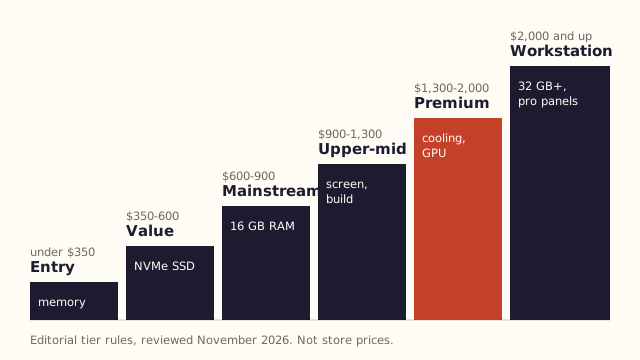
We sort laptop budgets into six tiers: Entry (under $350), Value ($350-600), Mainstream ($600-900), Upper-mid ($900-1,300), Premium ($1,300-2,000) and Workstation ($2,000+). Each tier has a minimum RAM, storage and screen we would insist on; the boundaries are editorial judgment, reviewed November 2026.
Key takeaways
- The tiers are rules of thumb, not prices: a sale can pull a laptop down a tier, and a configuration upgrade can push it up one.
- The floors rest on published minimums: Windows 11 (4 GB RAM, 64 GB storage), Chromebook Plus (8 GB, 128 GB, Full HD IPS) and Copilot+ PCs (16 GB, 256 GB SSD, 40+ TOPS NPU).
- Moving from Value to Mainstream is where 16 GB of RAM becomes the normal configuration, and that is the single most useful upgrade for most people.
Which published minimums are the tiers built on?
Three published floors anchor the rules: Microsoft's Windows 11 minimum, Google's Chromebook Plus floor and Microsoft's Copilot+ PC requirements.
| Standard | RAM | Storage | Other |
|---|---|---|---|
| Windows 11 minimum | 4 GB | 64 GB | TPM 2.0, UEFI Secure Boot, 720p display over 9 inches |
| Chromebook Plus | 8 GB | 128 GB | Intel Core i3 12th Gen+ or AMD Ryzen 3 7000+, Full HD IPS, 1080p webcam |
| Copilot+ PC | 16 GB DDR5/LPDDR5 | 256 GB SSD/UFS | NPU of 40+ TOPS |
A minimum is what the software agrees to run on. It is not what a laptop needs to feel quick after three years of updates, which is why our floors start above the Windows minimum.
What are the six tiers?
Each tier sets a RAM, storage and screen floor, lists what is realistic and names what to stop expecting.
| Tier | Budget band | RAM floor | Storage floor | Screen floor |
|---|---|---|---|---|
| Entry | under $350 | 8 GB | 128 GB | 1920x1080 |
| Value | $350-600 | 8 GB | 256 GB SSD | 1920x1080 IPS |
| Mainstream | $600-900 | 16 GB | 512 GB SSD | 1920x1200 or better |
| Upper-mid | $900-1,300 | 16 GB | 512 GB SSD | above 1080p, 400+ nits |
| Premium | $1,300-2,000 | 16 GB | 1 TB SSD | high-brightness OLED or mini-LED options |
| Workstation | $2,000+ | 32 GB | 1 TB SSD | calibrated or high-refresh panels |
At Entry, a Chromebook with 4 GB can still be reasonable for a browser-only job, and Google says Chromebooks released in 2021 or later get a decade of automatic updates. For Windows, we would not go below 8 GB.
How do uses change the floor?
Demanding uses move the floor up a step or require a higher minimum tier.
- Photo and video: one more RAM step and one more storage step; Mainstream or above.
- Gaming: one more storage step and a dedicated GPU, so Mainstream or above.
- Programming: one more RAM step; Value or above.
- Travel: Value or above, with weight and battery taking priority.
- Student, office and everyday use: no change to the floor, different priorities.
When should you break the rules?
When a sale or a refurbished unit lets you buy the next tier's floor at this tier's budget.
That is the point of knowing the floors: a refurbished Mainstream laptop with 16 GB at a Value budget is often a better buy than a new Value laptop with 8 GB. Check its warranty first; refurbished vs open-box vs new covers how.
Try the rules on your own number in the budget planner.
Questions people ask
Why are the boundaries round numbers?
Because people budget in round numbers and retailers price around them. The exact edge matters less than the floor you hold each listing to.
Do the tiers include tax?
Enter whatever number you actually budget with. If your ceiling includes tax, type that; the planner treats the figure you give it as the spend.
Sources
- Microsoft: Windows 11 specifications, including Copilot+ PC requirements
- Google: Chromebook Plus minimum hardware (The Keyword)
- Google: ten years of automatic updates for Chromebooks
Checked November 2026. Programs, dates and terms change; the linked page is the authority.